See your processes. Take control of workflows. Unlock their potential.
From the first task to the documented completion: Bring people, decisions and data into a common process.
Design processes graphically with BPMN. Keep an eye on ongoing processes and connect recurring steps with the appropriate functions of your animal database.
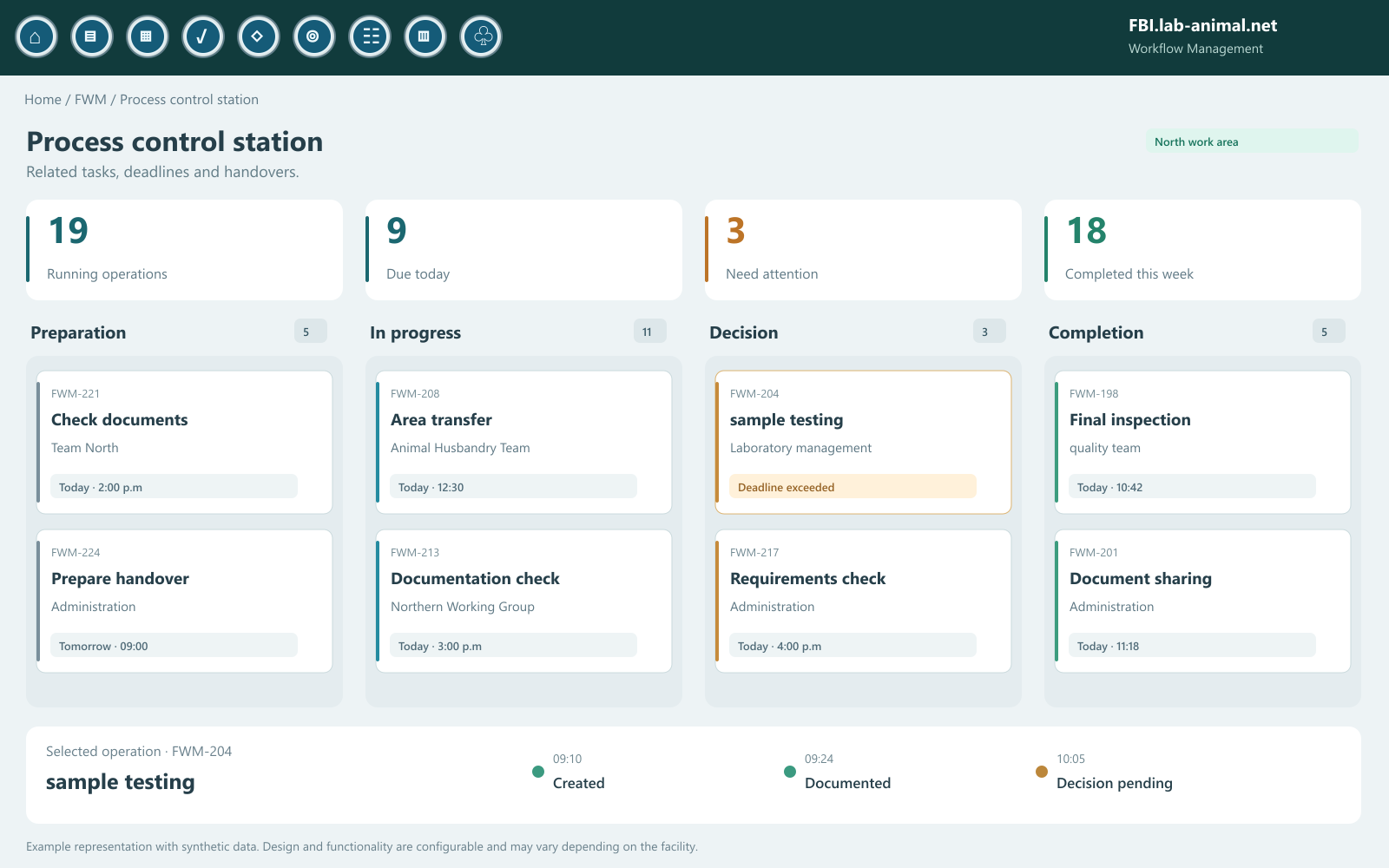
Processes, responsibilities and next steps at a glance.Enlarge view ↗
See the full picture. Know the next step.
More than a to-do list
Individual functions are into an understandable whole.
Who will take the next step? What information is missing? Where is a release waiting? FWM makes connections visible that are easily lost between individual masks, lists and responsibilities.
The process model describes the common path. The ongoing process shows where a specific case is located. Tasks, deadlines and progress help the team to work on this path in a controlled manner.
01Understand
Make processes and handovers visible together.
02Design
Model steps, roles and decisions.
03Connect
Connect tasks and corresponding records.
04Monitor
Track progress, deadlines and exceptions.
05Improve
Identify bottlenecks and adapt processes specifically.
01 · Graphical process design
A process. A common language.
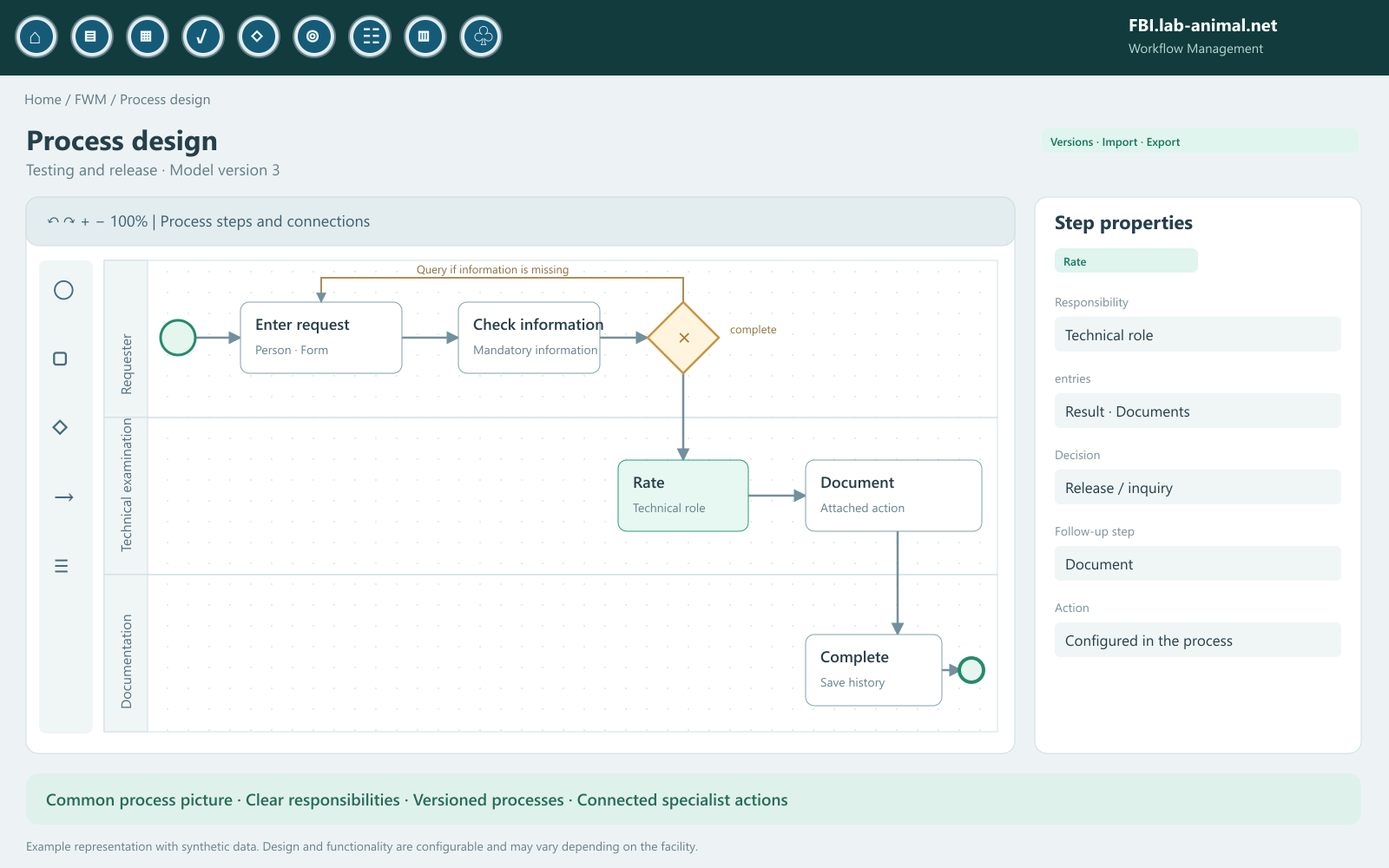
BPMN – Business Process Model and Notation – represents processes as an understandable diagram. Tasks, events, decisions and responsibilities are given a visible place.
A common process image connects tasks, decisions and documentation.Enlarge view ↗
event
What sets the process in motion? When does it end?
Task
What activity is carried out and by whom?
×Decision
Which rule leads to which further path?
roller conveyor
Where do responsibilities and handovers lie?
Model and design belong together: For use, the appropriate steps are linked to roles, rules, tasks and approved specialist actions in your institution.
Play through now
A process comes to life.
Perform a process step by step through the diagram. Make decisions and observe when the system continues working automatically.
Synthetic example record · Animal 08/15
Testing and documentation
Ready to start
The chart can be moved sideways on small screens.
Active stepAlready completedAutomatic actionSelect “Start Process.”
Start
Ready for your first run?
Start the example. You then take over the recording and make the decisions in the process.
Automatic records
0
After approval, the records appear here in the sample data record.
Event log
step by step
The history begins with the process start.
Interactive function example with synthetic data. All actions in this iteration take place on the local sample data set. The specific process and its records are configured for your facility.
02 · Overview and process control
Many operations. A clear overview.
From the overall picture to the individual work step: Identify open tasks, upcoming decisions and processes that need attention.
Your process control centerInteractive example · synthetic data
North Work Area · Today
Operations in the section8
In progress3
Waiting for release2
attention1
Completed2
8 processes
FWM-204 · Process details
sample testing
The documentation is available. The technical examination is waiting for a decision.
Current stepTechnical decisionResponsible: Laboratory management
09:10 · Process created
09:24 · Documentation added
10:05 · Decision requested
Attention: The agreed deadline has been exceeded.
Understand the status immediately
Current step, responsibility and next transition remain visible together.
Process exceptions specifically
Filters and status information help to find missed deadlines and open decisions.
Follow the process
Recognize who has processed a step and which decision determines the further path.
03 · Related tasks and records
Record once. Continue to use in the process.
FWM combines human decisions with set-up automatic actions. Existing information is available again in the next linked work step.
01 · TriggerStep completed
The required information and confirmations are available.
→
02 · ExamApply rule
Context, rights and mandatory information determine the further path.
→
03 · ActionTask or record
A connected function takes over the released data.
→
04 · HistoryDocument result
The processing status and the next responsibility become visible.
Less switching between individual masks.
Create a follow-up task, provide a message or execute a connected diary entry: Configured process actions save repeated entries and keep the connection to the process.
Automatic where it technically fits.
Which records are made automatically and which require conscious confirmation are determined for the respective process. Roles and access rights also apply in the process.
This is how automation and professional control complement each other.
04 · Understand and improve
Where are things going well? Where is the work left behind?
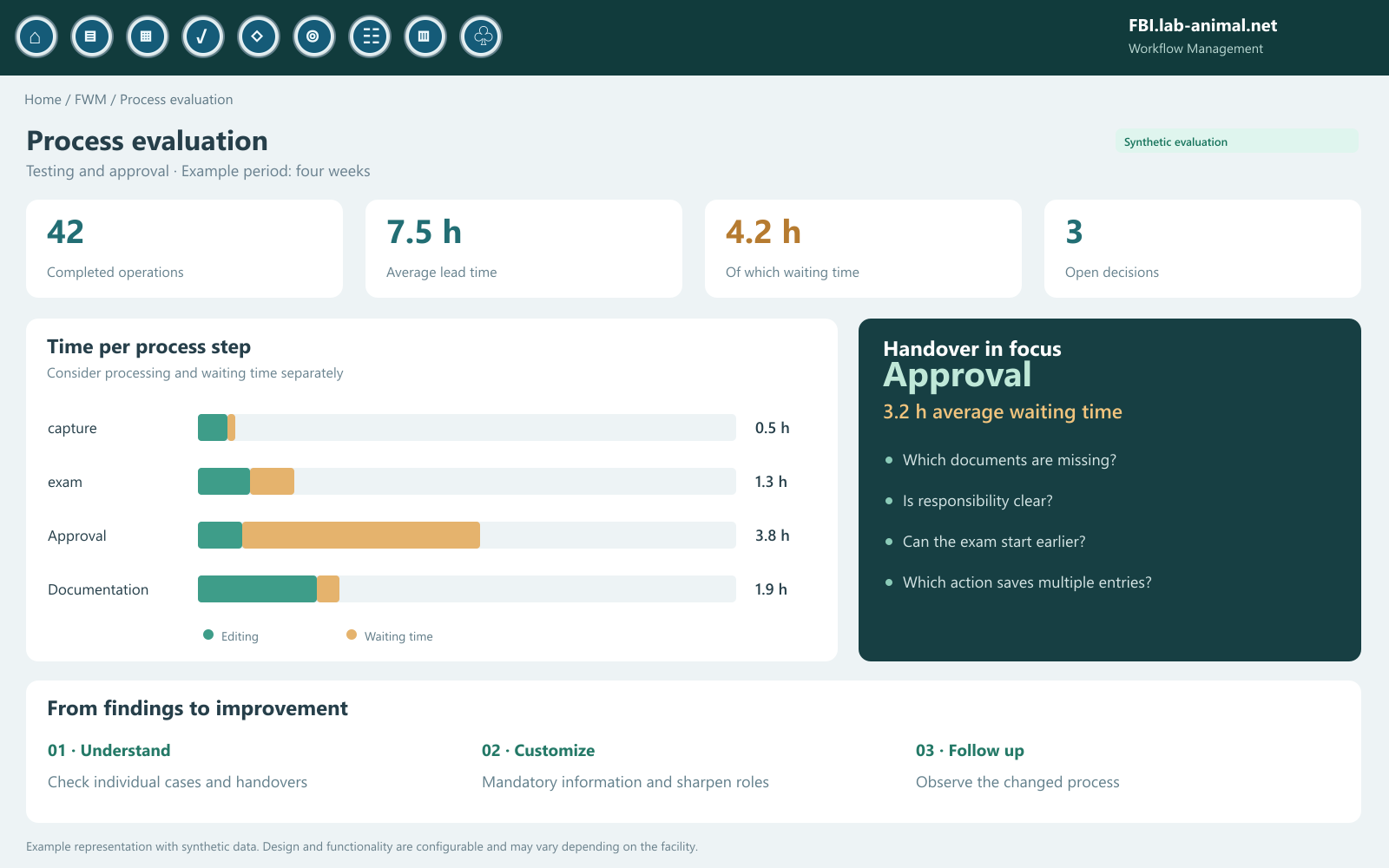
A process picture shows the way. Processing statuses and time references make it clear which handovers deserve special attention. This allows discussion about improvements to specific processes.
Example of an evaluation: Where is a process waiting and where is it being processed?Enlarge view ↗
Waiting times
Make handovers visible.
Is a process waiting for documents, approval or feedback? The common course helps to distinguish causes.
Process variants
Detect loops and detours.
Which questions come back again? Where is a mandatory field missing? The model and individual case provide clues for clearer processes.
Improvement
Coordinate changes in a targeted manner.
Summarize steps, clarify responsibilities, collect information earlier or automate an appropriate action.
Knowledge in a team
Explain processes clearly.
A common process image facilitates training, representation and coordination between work groups.
One principle · many workflows
For the positions, where work comes together.
The process design is based on your organization. The following scenarios show how responsibilities, data and decisions can be combined into a clear process.
01 / Organization
Request until release
Record concerns, check for completeness, assign to a responsible person and record the decision in a comprehensible manner.
capture → exam → Decision
02 / Collaboration
Transfer without loss of information
Connect required documents, completed tasks and queries with the process so that the next team continues to work in context.
Editing → Handover → Feedback
03 / Documentation
Examination until documented completion
Record results, obtain an assessment and, depending on the decision, complete or complete another task.
result → Review → Follow-up action
FWM is associated with the data and rights of FBI.lab-animal.net. The specific process and its associated actions are configured to suit your facility.
05 · An example at the end
Surgery and aftercare. A process that thinks ahead.
The surgical topic shows the principle in a concrete case: preparation, documentation, aftercare and necessary follow-up tasks remain connected to the animal.
OP & Aftercare
Function example
✓Preparation
✓Documentation
Aftercare & Review
Completion
Action document
Agreed rule fulfilled: The process can be completed.
Function example with synthetic data
From the intervention to the traceable conclusion.
PreparationCheck animal, permit reference and required information.
DocumentationRecord the implementation in the linked work step.
AftercareProcess assessment and agreed deadlines in context.
DecisionComplete the process or document an action as a follow-up task.
In the example, switch between normal cases and escalation. The decision path and the next work step change visibly.
Example representation with synthetic data. Design and functionality are configurable and may vary depending on the facility.
FBI Workflow Management
The animal database knows your data. FWM connects your processes.
Let's discuss which handovers, decisions and recurring tasks you would like to make clearer in your facility.